Free Until Minute Forty: Where Every Free AI Video Tool Actually Stops
Free AI tools are genuinely good. The problem is where they stop.
You do not find the limit at the start, when you could still change plan. You find it at minute forty, with the script written, the voice recorded and the shots generated – and then the export comes back with somebody else’s logo across the corner, or the credits run out three clips short.
At that point you have three options and all of them are bad: rebuild the shot, pay under pressure, or publish something with a watermark on it. The fix is not a better free tool. It is knowing which wall sits where before you commit to the video.
Five stages, and where free actually holds
Every video passes through the same five stages. Three of them can be done free with nothing stamped on the output. Two cannot, and those are the two people plan around by accident.
| 1. Topic → | 2. Script → | 3. Voice → | 4. Visuals → | 5. Edit & music |
|---|---|---|---|---|
| Free, no catch
Google Trends Nothing to hit. Nothing appears in the video. |
Free, with limits
Gemini, Gemini Notebook Usage caps only. Your output stays clean. |
Free, with limits
TTSMaker Length and voice choice are capped. Nothing is stamped on it. |
Watch out
HeyGen, Kling AI, Ideogram This is where watermarks and daily caps live. |
Free, no catch
DaVinci Resolve, YouTube Audio Library A real editor and licensed music, at zero. |
That is the whole strategy in one line: the stages that touch your final pixels are the ones to check before you start. Everything else caps how much you can do, not what the audience sees.
Ten swaps, with the wall written out
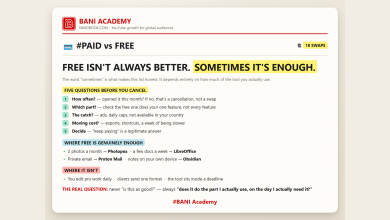
The paid pick, the free alternative, and the thing the free alternative will do to you. Checked September 2026.
| The job | Paid pick | Free swap | The wall |
|---|---|---|---|
| Script | ChatGPT Plus | Gemini | Free-plan usage limits. Nothing appears on your output. |
| Research | Perplexity Pro | Gemini Notebook | Free. Nothing reaches the video. |
| Voiceover | ElevenLabs | TTSMaker | Limits on length and voice choice. The audio itself is clean. |
| AI avatar | Synthesia | HeyGen | Watermark on your avatar video. Plan for it or do not use it. |
| Video generation | Runway | Kling AI | Credits run out, and clips carry a watermark. |
| Editing | Premiere Pro | DaVinci Resolve | None worth worrying about. The free version is a real editor. |
| Shorts & captions | OpusClip | CapCut | Some effects and export options are Pro only. |
| Thumbnails | Midjourney | Ideogram | Limited images per day. Fine unless you iterate hard. |
| Keywords | vidIQ Boost | Google Trends | None. Completely free. |
| Music | Epidemic Sound | YouTube Audio Library | None, and licensed for monetised video. |
Watch the reel
Every wall on one card, plus the three tools with no catch at all. Posted on the BANI Academy page.
Four kinds of wall, four detours
Not every limit is the same problem, and the detour is different for each. Knowing which kind you are facing takes about ten seconds and saves the afternoon.
| Kind of wall | What it costs you | The detour |
|---|---|---|
| Watermark | Your finished pixels. The most expensive kind, because it is visible to the audience. | Use that tool only for material the viewer never sees, or for shots you will crop. Never for the hero shot. |
| Credits that run out | Momentum. You stop mid-build with no warning. | Generate every clip you need in one sitting, before you start editing. Know the count going in. |
| Daily caps | Iteration. You get a few attempts, not twenty. | Write the prompt properly first, so attempt three is the good one rather than attempt fifteen. |
| Pro-only features | A specific effect or export setting, usually discovered at the end. | Check the export settings you need on day one. Most projects never needed the Pro feature anyway. |
The daily-cap row is quietly the most fixable. Most people burn a day’s image credits on vague requests and blame the limit; a properly specified prompt gets there in three attempts, which is the entire argument in vague in, vague out.
Build the spine on the three with no catch
Three tools on that list have no wall at all: Google Trends, the YouTube Audio Library and the free version of DaVinci Resolve. Topic, music and edit – three of the five stages, at genuinely zero cost, with nothing stamped on the output and nothing to run out of.
Add the free version of YouTube Studio for your real numbers and you have a complete spine. Everything else in the video becomes optional decoration, which is exactly the position you want to be in when a credit balance hits zero.
So the working habit is simple: plan the video on the clean tools, and let the walled ones handle only the parts where a watermark genuinely does not matter – internal drafts, tests nobody sees, B-roll you were going to crop anyway. A free stack built this way ships. One built the other way round strands you at export.
The wall that costs money rather than an afternoon
One limit is different in kind from the others, and it is the one people miss because nothing visible happens.
On a monetised channel, every asset needs a licence that permits commercial use. Several of the most popular free music generators allow personal use only – and a monetised upload is not personal use, regardless of how small the channel is. The file plays perfectly, the video looks fine, and the problem surfaces later as a claim or a strike rather than as an error message.
The YouTube Audio Library exists precisely to remove that question, which is why it sits in the no-catch column. If you use anything else, read the licence for the specific track rather than the marketing page for the tool.
The same applies to generated visuals: free to make is not the same as free to use commercially, and separately from licensing, platform disclosure rules apply to synthetic material however it was produced. Disclosing generated visuals without losing trust covers doing that without deflating the video.
Frequently asked questions
Which tools are genuinely free, with no catch?
YouTube Studio, Google Trends, the YouTube Audio Library, and the standard version of DaVinci Resolve. Everything else has a free tier with limits attached.
Can I remove a watermark from a free export?
Not honestly. Crop it, cover it in the edit, or use that clip somewhere it does not matter. Anything else is a licence problem rather than a technique problem.
Is it worth paying to remove the limits?
Only after a free tool has already saved you time on three finished videos. Paying to fix a workflow you have not proved is how subscriptions accumulate.
Do free tiers change?
Constantly. Anything you are not actively using has probably moved. Confirm on the provider’s own terms page rather than on a list – including this one.
Ten minutes before the next video
Take the video you are about to make and walk it through the five stages. For each one, name the tool and name its wall. Mark the stages that touch the finished pixels, and decide now – before you shoot anything – whether you route around the wall or accept it.
Ten minutes of that beats finding out at export, every time. Learning a lot does not make anyone good; doing a lot does.
If you want the structure that makes that stick, that is what our free challenge is built for: no barrier to entry, a genuine commitment to action, and a refundable commitment fee you get back when you finish. You are not paying for the knowledge. You are betting on yourself finishing, and we hold the stake.
And if the reason you are economising is that you now run more than one channel, the organisation side of that is a separate problem with separate tools – we set it out in one channel is a hobby, five is a system. For the wider tool map, sixty AI tools, ten jobs covers the rest.
Want the sheet with every free limit written out? Comment WALL on the original reel and we will send it over. Leave your name in the comment and we will reply to you directly rather than to the thread.
For more on building channels for English-speaking audiences, that is what we work on at mmoyoutube.com.
One Comment