Thumbnail Keywords vs Video Keywords: The Layer Most Creators Skip
The keyword layer almost nobody works on
A creator will spend an hour on the title, another twenty minutes on the description, and then export a thumbnail without once asking what phrase it is meant to represent. The video is, by every checklist, optimised. It is also getting impressions and almost no clicks, which means the system has nothing to work with and quietly stops showing it.
The gap is that a video keyword and a thumbnail keyword are not the same thing. They answer different questions, they are read by different parties, and they fail in different ways. Treating them as one field is why a technically well-optimised video can sit at a low click rate and never recover.
What a video keyword is doing
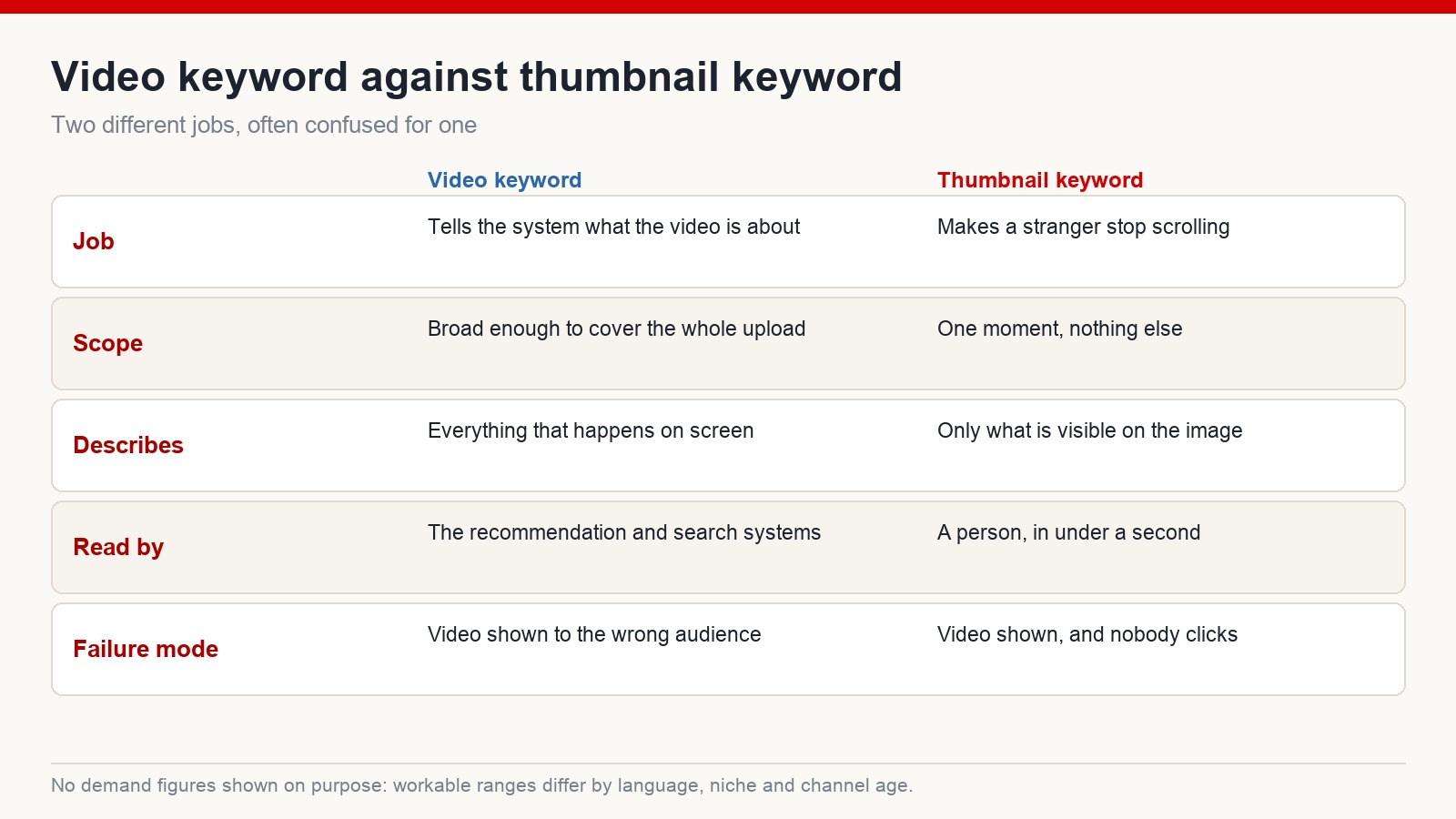
A video keyword describes what is inside the upload. If the video contains it, the keyword can name it.
This is the layer the recommendation and search systems read. It has to be broad enough to cover the whole thing, because a video usually contains several distinct moments and the phrase needs to describe the sum of them rather than one scene.
Say a wildlife compilation runs through a lion stalking prey, elephants crossing a road, and a car stopping for a herd. Reasonable video keywords for that upload would be wild animals crossing the road, wildlife encounters on the road, or animals versus cars. Each of them covers a good share of what a viewer will actually see. Any one of them would be a fair description if somebody asked what the video is about.
The broader the content, the more candidate phrases exist — which sounds like an advantage and usually is not. A video that contains a bit of everything is hard to describe in one phrase, and a phrase that covers everything tends to be too vague to attract anybody.
What a thumbnail keyword is doing
A thumbnail keyword describes one thing only: what is visible on the image.
Not the video. Not the channel. The frame a stranger sees while scrolling. If the thumbnail shows an elephant leaning into the side of a stopped car, the thumbnail keyword is elephant pushing a car — and the fact that the video also contains lions and a river crossing is irrelevant to this layer.
This is the narrowest phrase in the whole system, and it is also the closest one to actual human behaviour. Nobody clicks on a description. They click on an image plus a few words, decided in about a second, and then everything else you optimised finally gets a chance to matter.
The practical use of naming the thumbnail phrase is that it forces a decision. Once you have to state in words what the image shows, a thumbnail containing three competing subjects becomes obviously wrong. If you cannot say it in four words, the image is doing too much.
Three layers, read in opposite directions
It helps to see all of this as a stack rather than a list.
At the top sits the topic keyword: the broad territory the channel occupies. Nature relaxation. Wildlife documentaries. Personal finance for beginners. No single video answers it; a body of work does. This is the layer that tells the system what kind of channel it is dealing with.
Below that is the video keyword, describing this upload. Below that, the thumbnail keyword, describing this image.
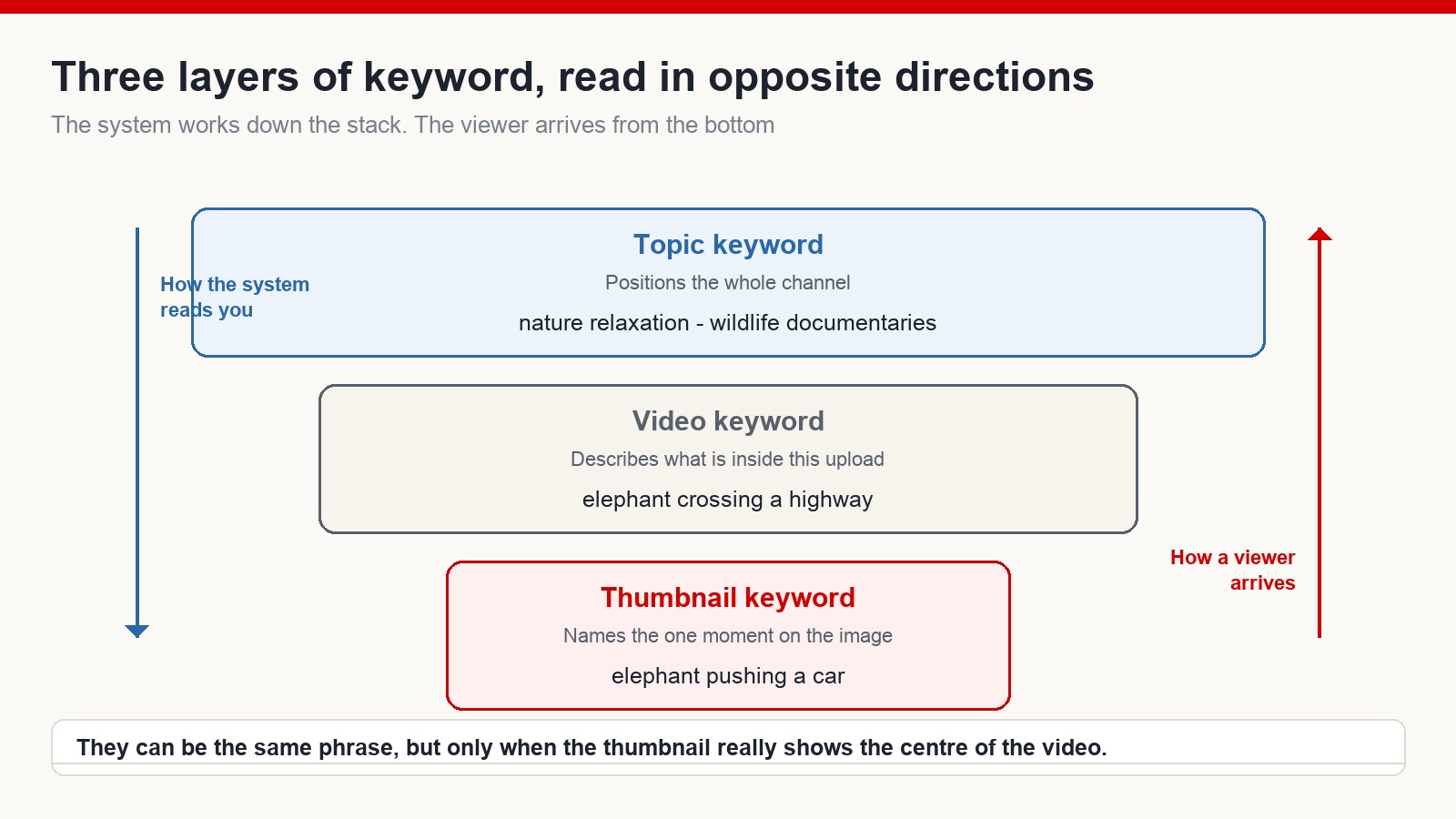
The part worth pausing on is the direction of travel. The system reads down the stack: it works out roughly what the channel is about, then what this video is about, then serves it. A viewer does the exact opposite. They see the thumbnail, read the title, decide in a second whether to click, watch a bit, and only after several videos do they form any idea of what the channel is.
Which explains something that otherwise looks unfair. Two videos with near-identical content, similar length, similar quality — and one is seen ten times more often. The stronger thumbnail was not a cosmetic advantage. It was the only layer the audience actually encountered before deciding.
When the two phrases should be identical
They are not always different, and forcing a difference is its own mistake.
If a video is genuinely about one event, and the thumbnail shows that event, then one phrase serves both layers. A ten-minute video built entirely around an elephant pushing a car, with a thumbnail of exactly that moment, does not need two vocabularies. Elephant pushing a car is the video keyword and the thumbnail keyword, and the alignment between them is a strength rather than a shortcut.
The rule underneath is not “always differ” or “always match”. It is that the thumbnail phrase must be true of the image, and the video phrase must be true of the video. When those two are the same thing, you have a video with an unusually clear centre, which is generally a good sign.
Where the mismatch does real damage
The expensive version of this is a thumbnail that promises a moment the video does not contain, or contains for four seconds somewhere in the middle.
It works, briefly. Clicks arrive. Then people discover the video is not the thing they were shown, and leave quickly, and the system reads that pattern accurately: shown, clicked, abandoned. That is a worse outcome than a modest click rate, because a video nobody clicked is merely undistributed, while a video people click and abandon has actively told the system something negative about itself.
The second, quieter mismatch is a thumbnail that is accurate but generic. Nothing false about it, nothing specific either. It describes a category rather than a moment, and categories do not make anybody stop scrolling.
The order to work in on a new channel
For a channel without much history, the sequence that causes the least rework is roughly this.
Settle the topic keyword first, because it determines everything the channel will publish rather than one video. Then pick the video keyword for this upload, checking that real demand exists for it before production rather than after. Then design the thumbnail around a single moment, and only then name the thumbnail phrase — if you cannot name it in a few plain words, redesign the image rather than the words.
Finally, make sure the three layers agree with each other. The thumbnail shows the moment, the title carries the phrase, the video delivers what both promised. When the chain holds, each layer strengthens the next. When it breaks anywhere, the work done on the other layers stops counting.
Frequently asked questions
Should a thumbnail keyword go into the tags or the description?
It can appear naturally in the title or description if the video really is about that moment. But the thumbnail phrase is mainly a tool for your own thinking — it forces the image to have one subject. Adding it as a tag is not where its value is.
What if the video has no single standout moment?
Then the thumbnail will be hard to design, and that is useful information. Either pick the strongest moment and build the video around it, or accept that the upload is a compilation and choose an image that represents the format honestly.
Does the topic keyword need to appear in every title?
No. It should be recognisable across the body of work rather than stamped on each video. Repeating it word for word in every title reads as mechanical and usually costs clicks.
How narrow should a thumbnail phrase be?
Narrow enough to describe one image and nothing else. If two different pictures could both fit the phrase, it is still too broad.
Two jobs, not one
Video keywords and thumbnail keywords are not competing for the same slot. One exists so the system can work out who might want this. The other exists so a person scrolling past decides, in the second they give you, that this is worth their time.
Get the layers agreeing — topic, video, thumbnail — and you have something more durable than an optimised upload. You have a channel that is legible to the system and recognisable to a viewer, which is the combination that lets a back catalogue keep working long after the week you published it. Nothing here guarantees views; distribution depends on far more than wording. It does remove one of the more common reasons a decent video is never seen.
The full process I use for building faceless channels aimed at English-speaking audiences is at mmoyoutube.com.
One Comment