Faceless Video: Ten Tools, and the Two You Actually Need to Start
Starting a channel without showing your face is mostly a tooling question – until you look at a list of ten tools and cannot tell which step each one belongs to.
So here they are sorted by the step: script to video, voiceover, a presenter who is not you, long video into short clips, subtitles and quick edits, and automatic posting. And the honest headline from the card: you do not need all ten. One tool to create and one to cut clips is enough to start.
The faceless chain, step by step
Every faceless video goes through the same five steps, whatever tools you use.
| 1. Script → | 2. Voice → | 3. Visuals → | 4. Clips → | 5. Post |
|---|---|---|---|---|
| The part that decides everything Topic, promise, first ten seconds |
Someone has to read it Your voice or a generated one |
Something on screen Stock, generated footage or an avatar |
One video, several posts The long cut becomes shorts |
Getting it out Upload, title, description, schedule |
| No tool does this for you | One tool | Same tool, usually | One tool | Do it by hand at first |
Step one is the one no product on the list touches, and it is the one that decides whether the video works. A generated presenter reading a topic nobody searched for is still a video nobody watches – which is why the planning work in demand first matters more than the tool choice below it.
The ten tools, by step
Six of the ten are creation tools that overlap heavily. Three are for cutting and captioning. One is for posting.
| Tool | Label on the card | What it does | Step | When it earns its place |
|---|---|---|---|---|
| Pictory | Text-to-video | Turns a script or blog post into a video | Create | Turning an article you already wrote into a first video |
| Invideo AI | AI text-to-video | A full video with script, stock and voice | Create | Starting from a topic rather than a finished script |
| Fliki | Voiceover & video | Two thousand or more AI voices over stock visuals | Create | When the voice matters more than the footage |
| Medeo | Chat-to-video | Describe the video, AI builds and edits it | Create | The fastest route from idea to something watchable |
| Vadoo AI | Short video maker | Quick vertical videos from a prompt | Create | Shorts-first channels |
| HeyGen | AI avatar video | A digital presenter instead of your face | Create | When you want a person on screen, disclosed as generated |
| OpusClip | Long-to-short | Finds the best moments and cuts them into clips | Cut | One upload becoming five or six shorts |
| Clipfly | AI clip creator | Generates video, images and music in one place | Cut | Filling gaps when you have no footage |
| Kapwing | Online editor | Subtitles, cuts and resizing in the browser | Cut | Captions and quick fixes without installing anything |
| AutoFeed | Social automation | Creates and auto-posts Shorts and TikToks | Post | Later – once the first ten videos exist |
Read the “step” column and the choice gets easy. You need one from the create group and one from the cut group. Picking two creation tools because both look good is how people end up with two half-learned workflows and no finished video – the one-default-per-job rule from eighty tools sorted by the job.
The post this came from
Watch the reel
Ten AI tools for faceless video, one card, sorted by what they do. Posted on the BANI Academy page.
What faceless does not mean
Not showing your face is a legitimate format – plenty of large channels never appear on camera. What it does not do is remove the obligations that come with publishing.
| What you are using | What you owe the viewer or the platform | Why |
|---|---|---|
| A generated presenter | Disclose it at upload, and do not imply it is a real employee or customer | YouTube asks creators to flag realistic synthetic people |
| A cloned or licensed voice | Check the licence covers monetised video before you publish | Voice tools differ sharply here, and some free tiers are personal use only |
| Stock footage | Check the licence for commercial use and for the platform you post on | Free libraries often have conditions people skip |
| Auto-posted clips | You are still responsible for every word that goes out | Automation does not transfer accountability |
| Music in generated clips | Confirm the rights, especially for monetised channels | A claim on one short can affect the whole upload |
The first row is the one to get right from video one. A digital presenter is fine; a digital presenter that viewers believe is a real person giving real testimony is not. Say it plainly in the description and, where it matters, on screen – the approach in disclosing generated visuals costs you nothing and buys the trust that a faceless channel otherwise has to earn slowly.
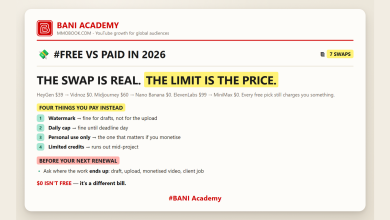
The licence rows matter the day the channel is monetised, not before – which is exactly why people miss them. Free tiers on voice and video tools are often personal use only, as we set out in the limit is the price.
The two mistakes that stall faceless channels
The first is treating the tool as the format. A faceless channel is not “a video made by an AI tool”; it is a channel where the useful thing is the information, the story or the demonstration rather than the presenter. Viewers do not reward the absence of a face. They reward a video that answers the thing they clicked for.
The second is publishing on volume alone. Because these tools make a video cheap to produce, the temptation is to produce many and hope one lands. That works far less often than people expect, and it buries the two or three videos that were worth watching under a pile that was not. Three considered videos a month beat twelve generated ones, for the same reason a tidy shelf beats a full one.
Both mistakes have the same cure: decide the topic and the promise before you open any tool, and let the tools do only the part after that decision.
A first month that actually ends in videos
Concretely: pick one creation tool and one clipping tool. Week one, make one video end to end, however rough. Week two, make the second one and cut three shorts from it. Week three, improve only the first ten seconds. Week four, repeat and look at what happened.
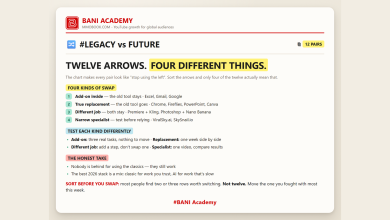
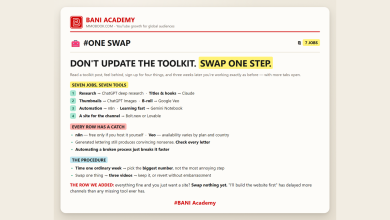
Keep the tool list frozen for that month. The temptation with ten options is to try a new one each week, which produces four half-finished projects and no channel – the trap behind one swap, not a new toolkit. Tools change fast, and most of what is on any list this year will be renamed or gone in eighteen months, as in we checked all sixty.
What does not change is the part no tool covers: the topic, the promise and the opening line. Draft several and record one, as in draft five, record one, and keep the thumbnail honest about what the video delivers – thumbnail ideas and the curiosity gap.
Frequently asked questions
Which two should I start with?
One creation tool that matches how you think – from a script, from a topic, or from a description – and one clipping tool. Nothing else until you have published five videos.
Do faceless channels still grow?
Yes, when the topic is one people search for and the first ten seconds deliver. The format is not the constraint; the promise is.
Is an AI avatar better than stock footage?
Only if a person on screen helps your topic. It also needs disclosure, which stock footage does not.
When should I automate posting?
After ten videos. Before that, posting by hand teaches you what titles and thumbnails do, and there is little to automate.
Publish one this week
Choose one tool from the create column and one from the cut column. Make a video about something people actually search for, disclose anything generated, and publish it before you read another tool list.
Ten tools is a menu. Two of them and a finished video is a channel.
Learning a lot does not make anyone good. Doing a lot does.
If you want the structure that turns that into a habit, that is what our free challenge is built for: no barrier to entry, a genuine commitment to action, and a refundable commitment fee you get back when you finish. You are not paying for the knowledge. You are betting on yourself finishing, and we hold the stake.
Which of these have you tried? Tell us in the comments on the original reel.
For more on building channels for English-speaking audiences, that is what we work on at mmoyoutube.com.