How To Publish YouTube Videos In A Language You Do Not Speak
There is a belief that reaching an audience in another language requires speaking it. It is one of the more expensive assumptions in this line of work, because it stops people from ever testing markets where the competition is thinner and the audience is larger.
I held it too, until the tooling made it obviously wrong. Producing a video in a language you do not speak is now a workflow problem rather than a language problem. It is more work than publishing in your own language, and it fails in specific ways you have to plan for – but it is entirely doable from a laptop anywhere in the world.
This is the process, including the parts that go wrong.
Why creators expand into other languages
The blunt reason is market size. A niche that is saturated in one language is often half-empty in another, and advertising rates differ substantially between countries. Channels that reach English, German or Japanese-speaking audiences often see very different revenue per view than channels reaching markets where advertisers spend less.
Being honest about this matters: a higher rate per thousand views is not a higher income. It is one variable among watch time, consistency, niche and a genuine element of luck. A localisation workflow removes a language barrier. It does not remove the ordinary difficulty of making something worth watching.
Step 1: write it where you think fastest
Do not attempt to write directly in the target language if it is not one you are fluent in. What you will produce is correct-ish sentences with no rhythm, and rhythm is most of what holds attention.
Write in whatever language your thinking happens in. Put your effort into the things that carry across intact: the idea, the story, the sequence of information, the hook. A strong script survives transfer. A weak one just becomes a weak script in a second language.
Step 2: rewrite, do not translate
This is the step people get wrong, and the fix takes one sentence.
Asking a model to “translate this script” gets you a translation: sentence by sentence, structure preserved, idioms carried across literally, register defaulting to formal written prose. It reads like a document.
Ask instead for a rewrite – name the audience, name the medium, name the tone. Something like: rewrite this as spoken narration for a German-speaking audience, conversational, short sentences, natural phrasing rather than a literal translation. The output changes character completely, because you have told the model what the words are for.
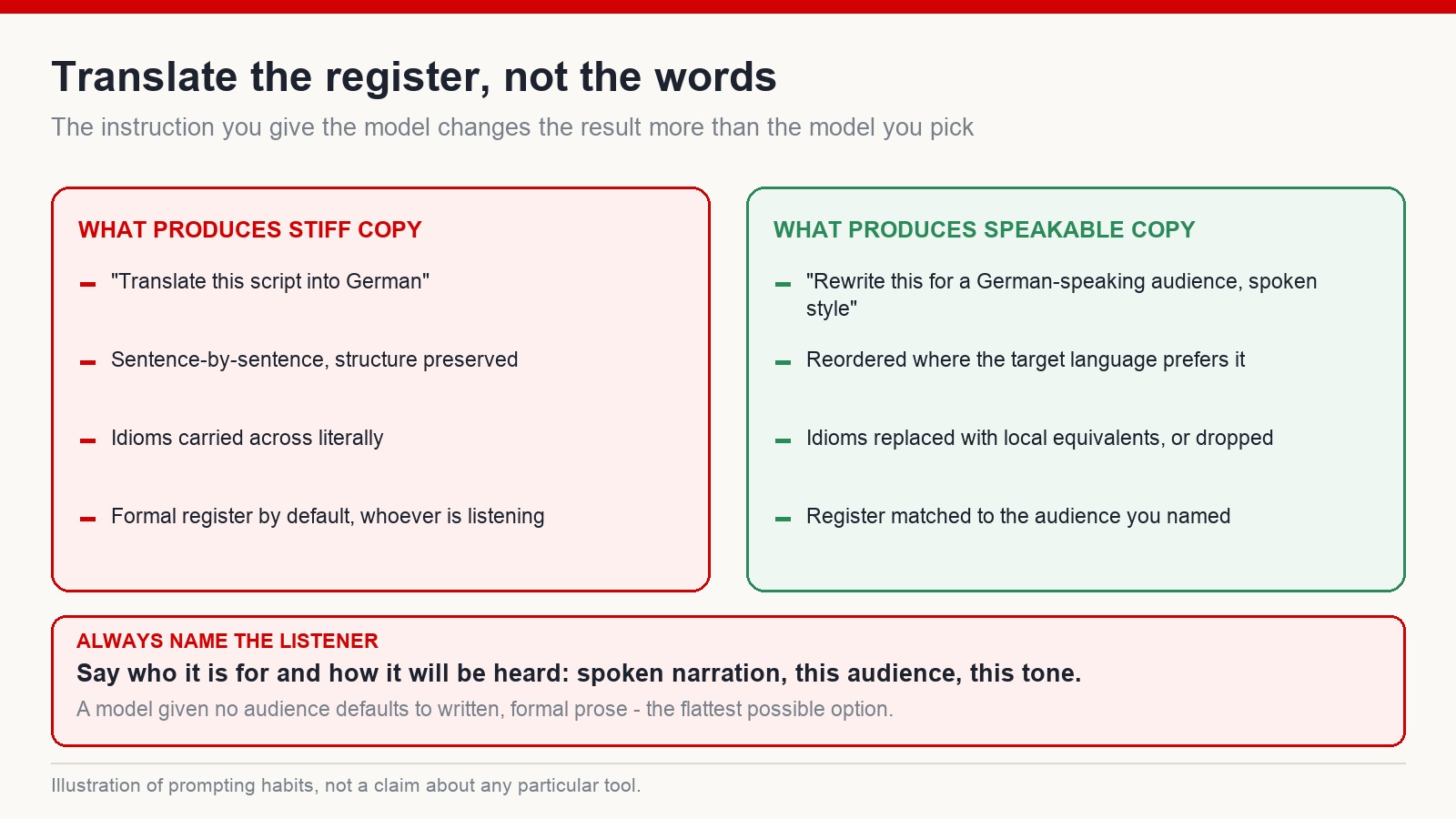
Run it in sections rather than one pass. Long single renders drift in tone, and you will not be able to hear that drift in a language you do not speak.
Step 3: the voice
Voice models handle a broad set of languages now, and the practical constraints are the same as in your own language: pick a voice suited to the format, set a pace slightly slower than feels right, and test one paragraph before committing to a full render.
Two things need extra attention when the language is not yours. First, proper nouns – places, people, brand names – are where synthetic voices most often mispronounce. Listen specifically for those before rendering ten minutes of audio. Second, keep the same voice across every video in that language. A viewer who returns should meet the narrator they remember.
Step 4: use captions as your map through the edit
Here is the mechanic that makes editing possible without comprehension.
Auto-caption the narration in your editor, then turn on a translated caption track alongside it. You now have a timeline where every line of foreign-language audio is annotated with what it means. You can see exactly where the script introduces a person, where it describes an event, where the turn in the story happens.
From there the edit is ordinary work: place footage against each beat, cut on the meaning rather than on the sentence, keep something changing on screen. When the visuals are done, delete the helper caption track and export – keeping the target-language captions if you want them, since a large share of viewers watch with sound off or as second-language speakers themselves.
Step 5: get one native read-through
This is the step people skip, and it is the one that pays for itself.
You do not need a professional translator. You need one fluent speaker to watch the video once and tell you where it sounds odd – not grammatically wrong, but odd. Too formal. Oddly phrased. A word nobody uses. A joke that does not land. Those are things no tool will flag, and they are exactly what makes a viewer feel the video was not made for them.
What breaks, specifically
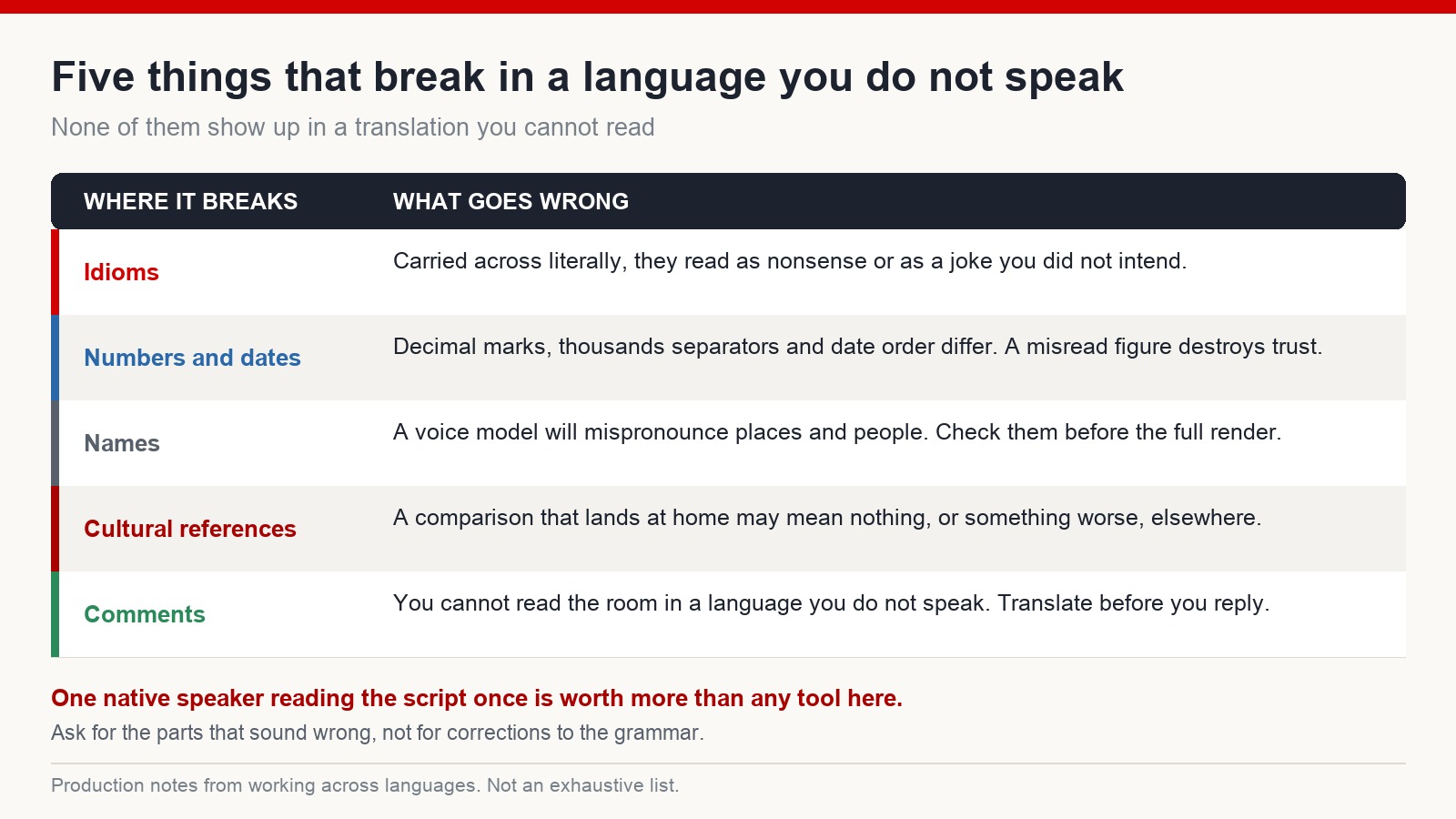
Idioms. Translated literally, they range from confusing to comic. Ask for local equivalents, or for them to be removed.
Numbers and dates. Decimal separators, thousands separators and date order all vary. A figure rendered wrong reads as carelessness, and in a factual video that is expensive.
Names. Covered above, but worth repeating – it is the single most common thing viewers comment on.
Cultural references. A comparison that works in your country may mean nothing elsewhere, or carry associations you did not intend. When in doubt, use something concrete instead of something local.
Comments. You will get replies in a language you cannot read. Translate them, draft a reply, translate it back to check it says what you meant, then post. It is slower than replying in your own language, but a channel that never answers reads as automated.
Use footage you have the right to use
One habit that has nothing to do with language and everything to do with survival: do not pull images and video from a search engine. Search results are not a licence. The fact that a file downloads does not mean you may publish it.
Work from licensed stock libraries, from free libraries with clear commercial terms, from generated material whose terms permit commercial use, or from footage you shot yourself. Mixing real footage with generated material also produces better videos than either alone – and it keeps you clear of the pattern where a channel is assembled entirely from other people’s work.
Should the whole thing be automated?
No, and this is where a lot of multilingual channels fall over.
It is technically possible to run script, translation, voice, visuals and captions through automated tools end to end. The result is usually a video that is competent and completely inert. Nothing in it came from a person who cared about the subject.
The parts worth keeping human: the idea, the angle, the story, and the judgement about what stays in the edit. Automate the transfer, not the thinking.
Frequently asked questions
Can I run a channel in a language I do not speak at all?
Yes, with the workflow above – and with at least one fluent reader checking scripts before they are published. Fully unchecked output in a language you cannot read is how avoidable mistakes reach an audience.
How do I edit if I cannot understand the narration?
Auto-caption the voice track and add a translated caption line alongside it. The captions become a map of what is being said and when, which is all an edit actually requires.
Should I publish captions in the target language?
Usually yes. Many viewers watch without sound, many are second-language speakers themselves, and accurate captions also help the platform understand what the video is about.
Is it better to add a language or to go deeper in one?
For most people, deeper in one. A second language multiplies production work before it multiplies anything else. Expand when your process in the first language is already routine.
The takeaway
Language stopped being the hard part some time ago. What is still hard is the same thing it always was: having something to say, structuring it so people stay, and doing it often enough to get good at it.
If that is the part you want to work on, the training system at mmoyoutube.com walks through it with guided practice. Results vary with niche, effort and timing, and no process removes that.