How to Build a Faceless YouTube Channel with AI: A 12-Step Workflow
There was a stretch where I published close to twenty AI-assisted videos in a row and the view count barely moved. Not a disaster – just flat. Flat is worse, in a way, because there is nothing obvious to fix.
What I eventually understood is that YouTube is not short of people who can operate AI tools. ChatGPT writes a script. A text-to-speech tool reads it. An editor stitches it together. All three take an afternoon to learn, which is exactly why having them is not an advantage.
What is short is people who have turned those tools into an actual production line, in an order that holds up. Below is the workflow I use, in four phases and twelve steps. Nothing in it is a shortcut. It is mostly just the right sequence, which turns out to matter more than any individual tool.
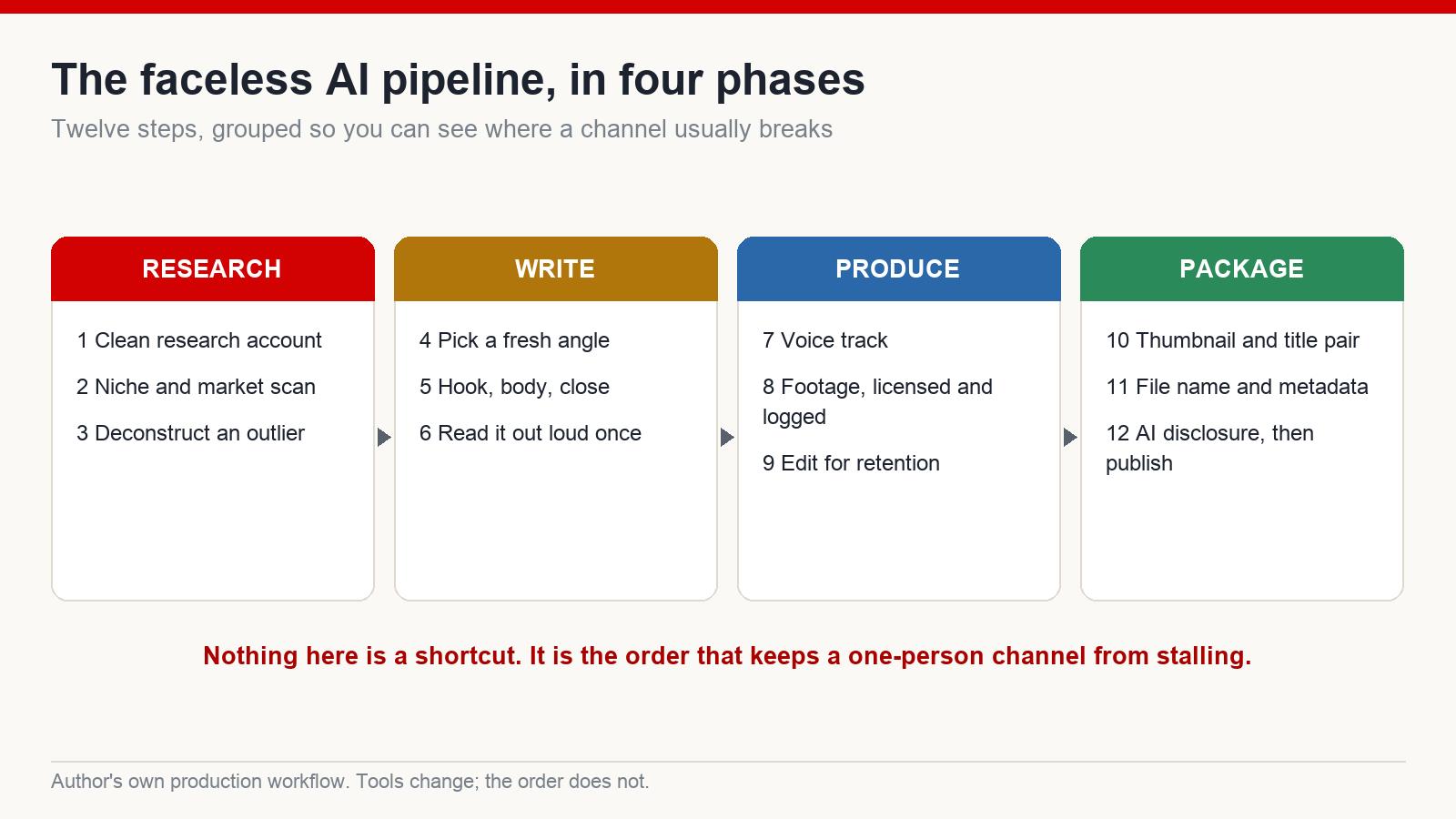
Phase one: research
1. Start from a clean research account
The most common early mistake is doing niche research from your personal account. Your recommendations are already shaped by years of your own viewing, so what you see is a mirror, not a market.
Open a fresh account and keep it clean. No entertainment viewing on it, no idle browsing. Search only inside the niche you are considering and watch only what belongs to it. Within a week or two the recommendation feed becomes a rough instrument for reading that market rather than reading you.
2. Scan the niche properly before you commit
This step decides more than any other whether the channel survives. A beautifully produced video in a badly chosen niche still goes nowhere.
What I look for: channels that are still small relative to the leaders in the space, that started recently, and that have at least one video pulling far more views than the channel’s own subscriber count would suggest. That last part is the signal. It means the topic is being pushed by the algorithm rather than by an existing audience – which is the only way a new channel gets a look in.
Then check the market behind the audience. Advertising rates differ enormously by country and by subject, and a video aimed at one audience can be worth several times another for the same production effort. That is not a promise of income, and rates move constantly – but it is worth knowing before you spend six months building for the wrong room.
Tools that help: vidIQ or TubeBuddy for keyword and competitor data, and a general AI assistant for pulling apart what a video is actually doing.
3. Deconstruct one outlier, do not copy it
Take the single best-performing video in your niche and pull it apart. Paste the link into an AI assistant that can watch video and ask it to describe the content and the style. You are looking for the structure, not the material: how the opening seconds are built, how the argument is sequenced, what the viewer’s underlying frustration seems to be, what emotional register it stays in, how it closes.
One good video usually contains several separate insights – about automation, about being a beginner, about a business model, about search behaviour. Each of those is a different video for a different audience. That is what deconstruction gets you, and it is the difference between learning from a competitor and cloning one.
Phase two: write
4. Pick a fresh angle before you write a word
Take the insight you extracted and choose who it is for. The same core idea written for teachers, for parents working from home, for freelancers, for people changing careers, is four genuinely different videos – different pain, different opening, different examples, different proof.
This is what lets a channel publish frequently without publishing the same thing repeatedly. It is not a way of re-skinning one script four times; if the only thing that changes is the wording, you have made one video four times and the systems that check for duplication will read it that way.
5. Build the script as hook, body, close
Most AI-assisted videos lose their audience in the first fifteen seconds, and it is almost always the opening’s fault.
The hook is two or three sentences and it does not include a greeting. Skip the introduction entirely and open on the problem: the thing that is not working for the person who just clicked. Something along the lines of “if your uploads are landing and nothing is happening afterwards, there is usually one reason, and it is not the one people assume.”
The body follows one line of reasoning – first this, then this, then this. AI drafts love to jump sideways into a related idea, and every jump costs you viewers. Hold the thread.
The close asks for one specific thing, in the voice of the video rather than in the voice of a channel begging for engagement.
6. Read the whole thing out loud, once
This single unglamorous step removes most of what people mean by “AI smell”. Machine-drafted prose is grammatically clean and rhythmically dead – sentences of similar length, no fragments, no interruptions, nothing that sounds like a person changing their mind mid-thought.
Read it aloud and you will hear every place it goes flat. Break the long sentences. Put your own examples in. Say the thing you would actually say. Retention lives here, before a single frame is edited.
Phase three: produce
7. Record the voice track
Voice determines whether a video feels made or generated, and it is the fastest thing to get wrong. Tools like ElevenLabs are strong now, but the settings matter more than the brand: moderate pace, real emphasis, natural pauses, and none of the flat even delivery that gives synthetic narration away.
For an English-speaking audience, prefer a conversational read over an announcer read. If the narration sounds like an airport, viewers leave before the content has a chance.
8. Use footage as illustration, and keep the licences
This is where a lot of channels quietly break their own monetisation. The failure pattern is always the same: pull stock clips, string them together, render, upload. That is the exact shape of what platform reviewers treat as recycled, low-effort content.
Stock is illustration. It is not the content. The content is your voice, your structure, your point of view, your pacing. Practically:
- Cut clips short – a few seconds each, never long unbroken runs.
- Mix sources rather than pulling a whole video from one library.
- Vary the setting, the crop and the zoom between clips.
- Keep something moving on screen; never let it go static.
- Add subtitles.
Libraries worth having: Pexels and Pixabay for free material, Artlist and Envato Elements for paid. And save every licence in a folder next to the project. If a claim ever lands on the video, that folder is the only argument that works.
9. Edit for retention, not for polish
The first thirty seconds carry heavy motion, no long static frames, no channel intro, and an opening line that leaves a question hanging. After that: change the angle regularly, use gentle zooms, keep the background alive, and avoid obvious looping of the same clip.
Subtitles are not optional – a large share of any audience watches without sound at some point. Music sits underneath and never competes with the narration, which is the most common mistake I see in the edit of a beginner’s video.
Phase four: package
10. Make the thumbnail and title into a pair
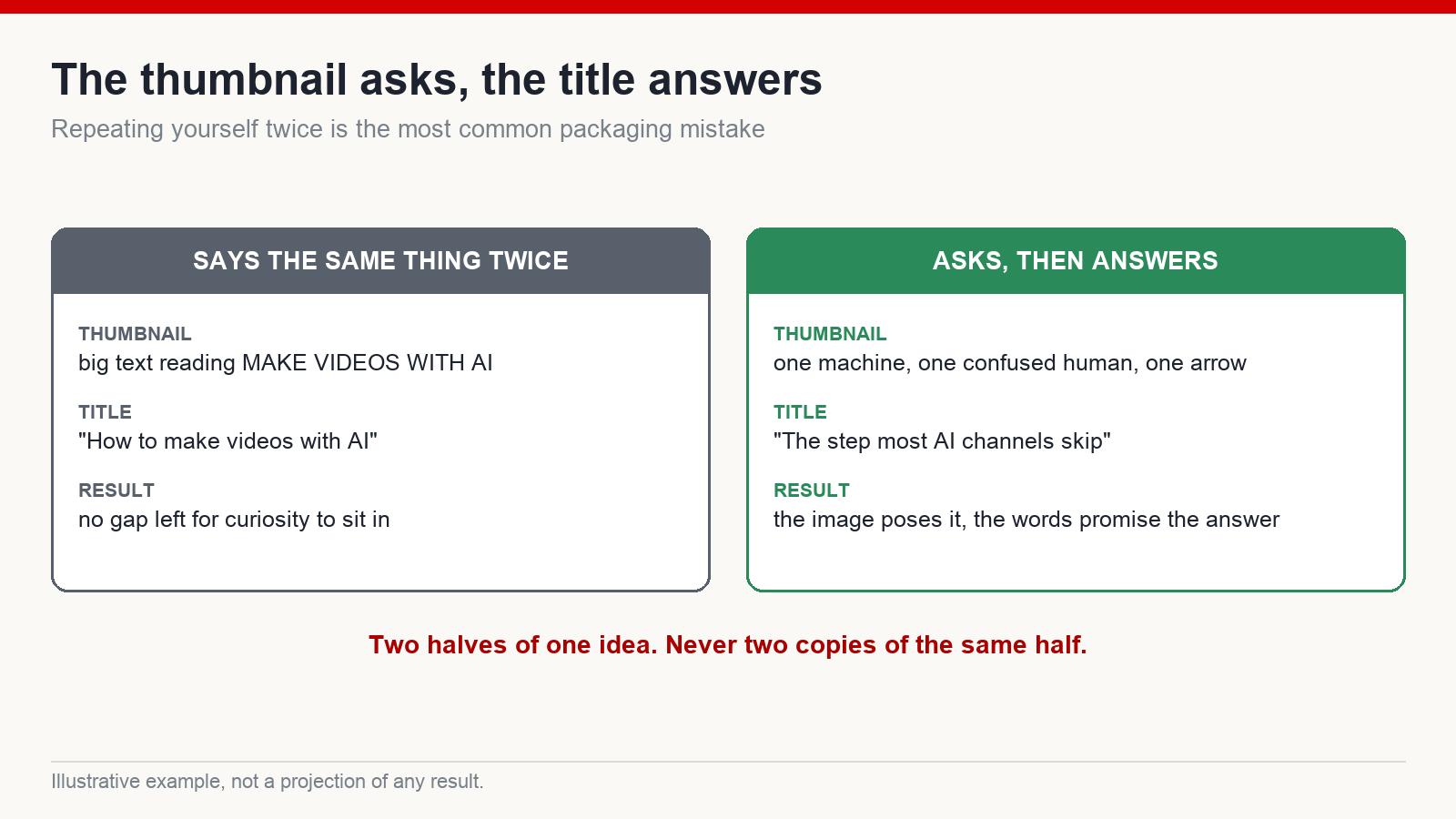
The thumbnail is what earns the click, and its job is curiosity: one clear subject, one thing that does not fit, a simple background, high contrast, readable at the size of a postage stamp.
Then the pairing, which is where most people lose their click-through. If the thumbnail says one thing in large text and the title says the same thing in words, you have used two assets to deliver one idea and left no gap for anyone to be curious about. The image should pose the question; the title should promise the answer.
For the title itself, structure it as the search phrase plus a reason to care – keywords get the video found, curiosity gets it clicked, and you need both. Generate ten variants, then choose deliberately rather than taking the first one.
11. Do the boring metadata properly
Before uploading, rename the file to match your keyword rather than leaving it as an export name. It is a small metadata signal and it costs ten seconds.
Then the upload checklist: primary keyword in the title, a description written for a reader rather than stuffed, a relevant tag set, a custom thumbnail, sensible hashtags, and the right playlist. Run the platform’s own copyright checks before you make it public. Do not publish and hope.
12. Disclose AI, then publish
If your video contains a synthetic voice that could be mistaken for a real person, realistic AI-generated imagery, or any altered likeness, disclose it. YouTube’s rules on this have tightened steadily and the disclosure costs you nothing.
Non-disclosure, on the other hand, risks reduced distribution or worse, and it is a strange thing to gamble a channel on. Transparency is the cheap option here.
What actually gets a channel suppressed
Almost none of it is about using AI. AI is not against the rules. What gets flagged is the absence of transformation – content that has been moved rather than made.
The recognisable signals: slideshows of still images, the same footage looping through a video, robotic narration, thumbnails copied closely from a competitor, scripts that are a competitor’s script paraphrased, stock clips used untouched from start to finish.
And a warning about the other direction. In every wave of automated content there is a cottage industry of tricks meant to disguise recycled footage from automated review. Do not build on them. Automated review has improved faster than the tricks have, the penalty falls on the whole channel rather than the one video, and you will have spent your effort on something with no residual value. There is no version of this where the trick is the durable asset.
The safe path is genuinely unexciting: your own voice, your own structure, your own angle, your own pacing, your own thumbnails. That is what “transformative” means in practice.
The minimum toolkit
You need fewer tools than you think:
- An AI assistant for research and deconstruction
- An AI writing tool for drafts you then rewrite by hand
- A text-to-speech tool for narration
- An editor – CapCut is more than enough to start
- Canva for thumbnails
- vidIQ or TubeBuddy for keywords
That is the whole list. Beginners far more often stall from tool overload than from missing a tool. Every new subscription is another thing to learn instead of another video published.
What AI actually changed
It used to take a camera, a room, and someone who could edit. Now it takes one person, a laptop and a process. That is a real shift and it is worth being excited about.
What it did not change is who wins. AI does not replace understanding an audience – it amplifies whoever already has it, and amplifies the emptiness of whoever does not. Point it at retention, at click-through, at telling a story properly, and the leverage is enormous. Point it at volume alone and you get twenty flat videos, which I can tell you from experience is a slow way to learn a fast lesson.
Results vary widely, platform rules change, and no workflow guarantees anything. Start from one clear niche, a minimal toolkit and a real retention strategy – and stop trying to clone the winner. Build the better version instead.
Frequently asked questions
Will using AI get my channel demonetised?
Not by itself. YouTube does not ban AI-assisted content. It restricts recycled content, low-effort content and undisclosed synthetic media. If your video has genuine transformation and a point of view, it can be monetised normally – though policies do change, so read the current rules rather than trusting any article, including this one.
Do I need to speak English to build a channel for English-speaking viewers?
Not necessarily, though it helps enormously with judging whether a script sounds natural. Writing and narration tools handle a lot of the gap. What you cannot outsource is knowing whether the result actually reads like a person – which is why the read-it-aloud step matters more for you, not less.
Can a video be made entirely from stock footage?
It can, and it usually should not be. Stock is illustration. If the footage carries the whole video and nothing else has been added, that is exactly the shape of content platform reviewers treat as low effort.
How many videos before a channel starts working?
Nobody can honestly give you a number, and anyone who does is guessing. What I can say is that fewer, better videos with a real angle tend to outperform a high-volume schedule of near-identical ones – and that most channels are abandoned before the process has been followed properly even once.
Which niches are easiest to start in?
Evergreen subjects scale best because the back catalogue keeps working: software and tools, personal finance, productivity, storytelling, faceless documentary. Choose one you can stand to research every week for a year, because that is the actual commitment.
I have been building faceless channels for English-speaking audiences since 2017, and this workflow is the version that survived the mistakes. If you want the longer form of it, that is what I write about at mmoyoutube.com.