New YouTube Channel With No Views? Watch Only One Metric: Thumbnail Impressions
The night you open YouTube Studio and the dashboard blinds you
Eleven at night. You have just flipped the last switch and moved the first video of your life from private to public. Your heart skips. Then you open YouTube Studio.
And you freeze.
In front of you is a forest of numbers. Views. Watch time. Click-through rate. Subscribers. Estimated revenue. Every box a different colour, every box an arrow pointing up or down, every box whispering something you cannot translate. You refresh. You refresh again. Views sit at 7. You wait, it jumps to 9. You are delighted. You refresh once more and it drops back to 7. Someone clicked in, watched a few seconds, and left.
You sit there in the middle of the night with your hand still on the mouse, and the sentence arrives, the one I would bet a lot of people have thought: maybe I am just not built for this.
Wait.
I tell that story because I sat in that chair. A lot of the creators I have coached sat in the same chair, with the same blue light on their face and the same knot in their stomach, carrying a fear nobody says out loud: that all this effort is going nowhere.
Here is what nobody told you that night. On a channel that was born four hours ago, almost none of those numbers can be trusted. They are not flickering because your channel is broken. They are flickering because they have not gathered enough data to say anything honest yet.
You do not need to watch ten dials. You need to watch exactly one. This whole article exists to tell you which one.
What thumbnail impressions are, and why a new channel watches nothing else
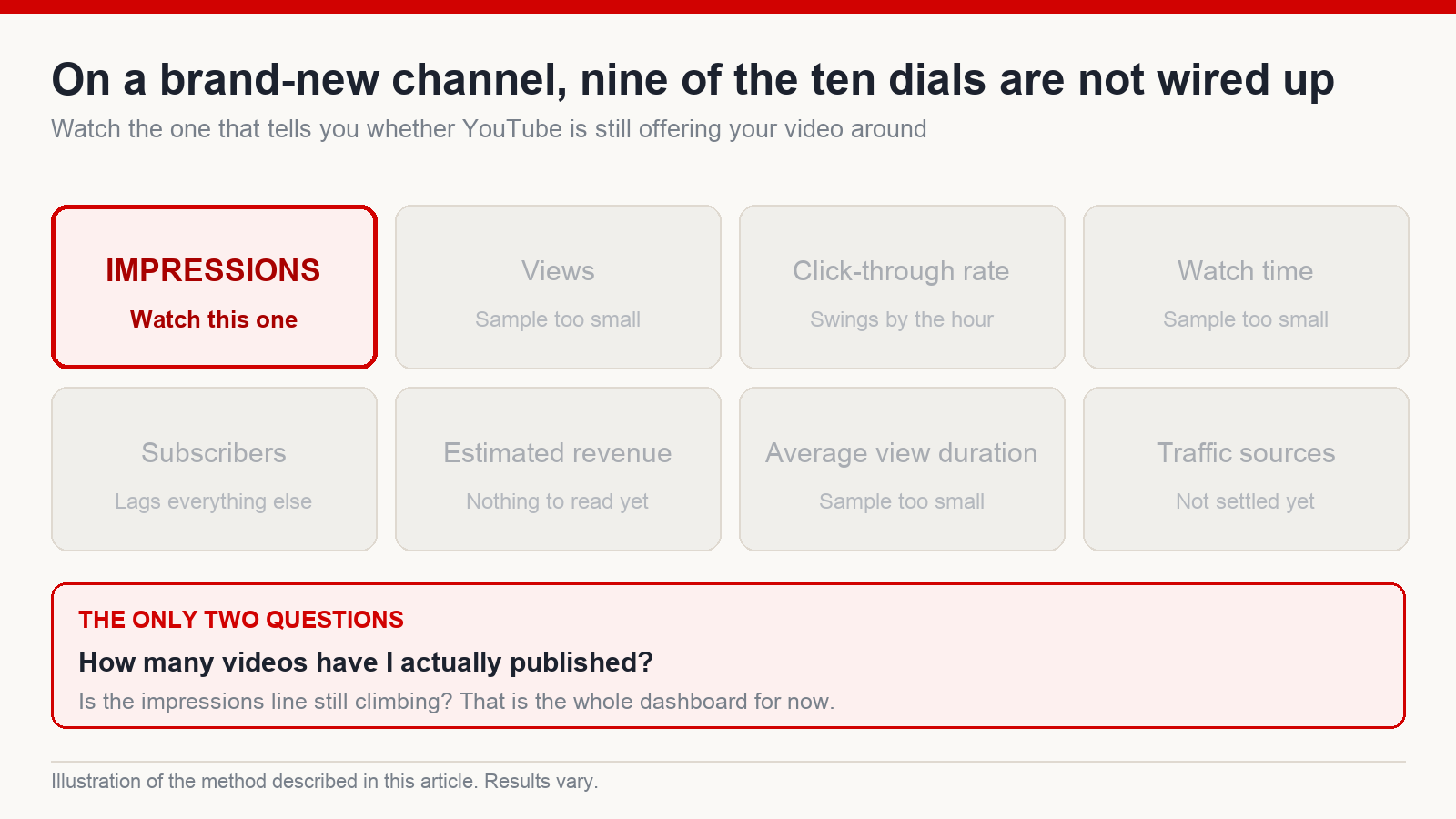
Nobody explained this to me when I started, so I paid for it with months of looking at the wrong column. In the early stage, a new channel needs to track one number. Not views. Not estimated revenue. Thumbnail impressions.
An impression is a count of how many times YouTube put your thumbnail in front of a real person. A view is a count of how many times someone actually clicked. Think of it this way: impressions are YouTube taking your video out and offering it around. Views are people nodding. On a new channel the first question is not “is anyone watching me”, it is “is YouTube still willing to carry me out the door”.
That is the survival signal when you have no views yet. If impressions are still climbing, the system is still testing you, still looking for somewhere to place your video in an ocean of content. As long as that number keeps inching up, the door is open.
So for every new upload I ask myself exactly two questions. One: how many videos have I actually published? Two: is the impressions line climbing? That is it. I do not sit there arguing with myself about whether the content is good, because at this stage that question has not come up yet. I do not need to know how strong the video is on the inside. I only need to know how many I have shipped and whether distribution is expanding. That is the entire measurable surface for now.
Where does the number live? Open YouTube Studio, go to Analytics, and look under the Reach tab, where impressions sit. You do not need to read it deeply yet. Just glance at whether the line is going up, sideways or down.
Hold onto that one number and half the panic disappears. The other half goes when you understand why the rest of the columns are lying to you, so that you stop sneaking looks at them.
Why views, CTR and watch time are not trustworthy yet
I know your hands are itching to inspect click-through rate and average watch time. On a new channel neither of them can be measured accurately. YouTube is not hiding anything from you. There simply is not enough data for the numbers to tell the truth.
This is plain statistics. A rate is only meaningful when it is computed across enough events. When a video has a few dozen or a few hundred views, your CTR reads 8% this morning, 3% this afternoon and 11% tomorrow – not because you got better and then worse overnight, but because the sample is so small that the number bounces around at random.
My own working threshold, built from years of reading dashboards alongside the creators I coach, is that metrics only start being worth reading once a channel is doing on the order of a thousand views inside 48 hours and holding that for at least a couple of days. Below that, whether a video pulled two hundred views or two thousand, CTR is not a thing you need to spend a night worrying about. To be clear, that threshold is my rule of thumb, not a figure YouTube publishes.
The picture I use is a car. Reading a new channel’s analytics is like driving while staring at ten gauges on the dash when nine of them are not wired up. Every needle twitches, every needle makes you flinch, and nine of the ten are inventing their readings. The more you stare, the worse your steering gets.
And here is the real cost, the one I watch push people out of the game. They read a phantom CTR, decide it looks bad, panic and swap the thumbnail. The next day the number jumps again, so they change the content too. Tear down, rebuild, tear down again, all on the basis of a signal that was never real – until they are exhausted, discouraged, and the channel goes quiet. They were not bad at this. They read the wrong scoreboard, then blamed themselves over a number that was never solid enough to blame anyone.
So for this stage, leave the other nine gauges alone. Your job is elsewhere – and first of all, there are a few buttons you need to stop pressing.
Four things to leave alone on a new channel, and one to do instead
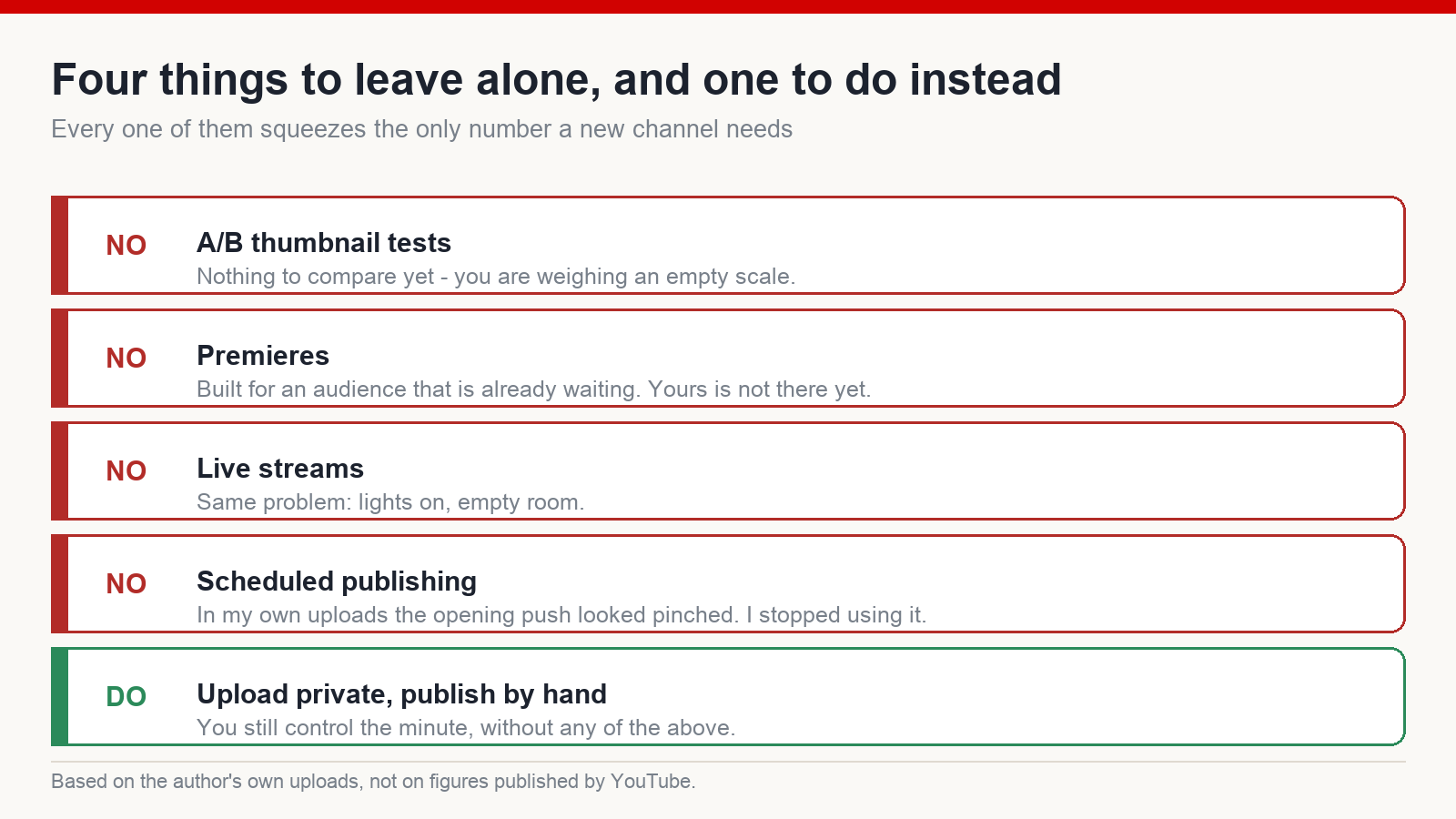
There is a paradox I meet again and again in beginners: the more impatient they get, the more reliably they press the buttons that are quietly hurting them. It is not laziness. It is the opposite. YouTube lays out a feature, they play with it, they believe they are optimising, and they end up throttling the one thing that needed feeding: impressions. Four things I would ask you not to touch, plus one thing to do instead.
One: do not run A/B thumbnail tests. That feature rotates two or three thumbnail options and compares which one gets clicked more. A new channel has almost no views, which means almost no sample to compare with. Comparing across an empty set produces meaningless output. You are calibrating a scale with nothing on it.
Two: do not use premieres. A premiere schedules a video to “go live” so people watch together and chat. That mechanism was designed for creators who already have a loyal audience waiting. A new channel has nobody waiting. You open the room and sit in it alone, listening to the echo.
Three: do not live stream. Same reason. There is nobody there yet to attend. Lights on, camera rolling, empty room.
Four: do not use scheduled publishing. This one is subtle, which is why so many people get caught by it. In my own uploads, when a video sat in the “scheduled” state, the opening push of impressions looked pinched rather than opening up the way it normally did. The first stretch of a video’s life is the most important one; I stopped handing it to a timer. I will be straight with you: this is an observation from my own channels, not something YouTube has documented.
So how do you publish at a chosen time without scheduling? Like this. Upload the video and leave it private. At the minute you want, switch it to public by hand. That is the whole technique. You keep control of the timing and avoid every trap above.
Four things not to do, one to do. At this stage, that is enough to remember. Once the traps are avoided, the rest of the job is reading the impressions line correctly each day.
Three states of the impressions line, and what to do in each
Once you have trained yourself to look at a single column, the daily impressions line becomes your entire dashboard. No more ten needles competing for your attention. One line, and it can only do three things. Learn one reflex for each and you stop making decisions on feeling at midnight.
Before the three states, one piece of vocabulary, because I use it constantly. When I say keep feeding it, I mean the work that gives YouTube more to distribute: publishing another video, staying on rhythm, giving the system more chances to offer you around. It is not a trick. It is the thing that pushes a sleeping line upward.
Flat. Impressions sit still for a few days, neither up nor down. This is the moment to keep feeding it. Publish on schedule, get another video out, keep your hands moving. Do not stand and watch the line.
Falling. This is where beginners fall hardest. They see impressions drop, their stomach tightens, and they start rebuilding: change the niche, narrow the topic, go deeper because “clearly I am not good enough yet”. On a young channel that is the sweetest trap there is. The correct move on a falling line is the same as on a flat one: keep feeding it. Do not narrow the niche yet, do not tear anything down. The channel is far too new for you to know what is genuinely broken. Hold the wheel straight.
Rising. Impressions are climbing steadily – the first good sign. Now you get a little room: add some Shorts to catch a new stream of viewers, widen the subject matter slightly. But keep feeding it as usual. Do not treat a rise as permission to coast, and do not throw out the formula that produced it.
Three states, three actions. Flat means keep feeding it; falling means keep feeding it and leave the niche alone; rising means widen a little while still feeding it. Notice that two of the three call for nearly the same behaviour. This framework exists so that you respond with discipline instead of panicking every time a number twitches.
A channel that climbs and dips is behaving normally
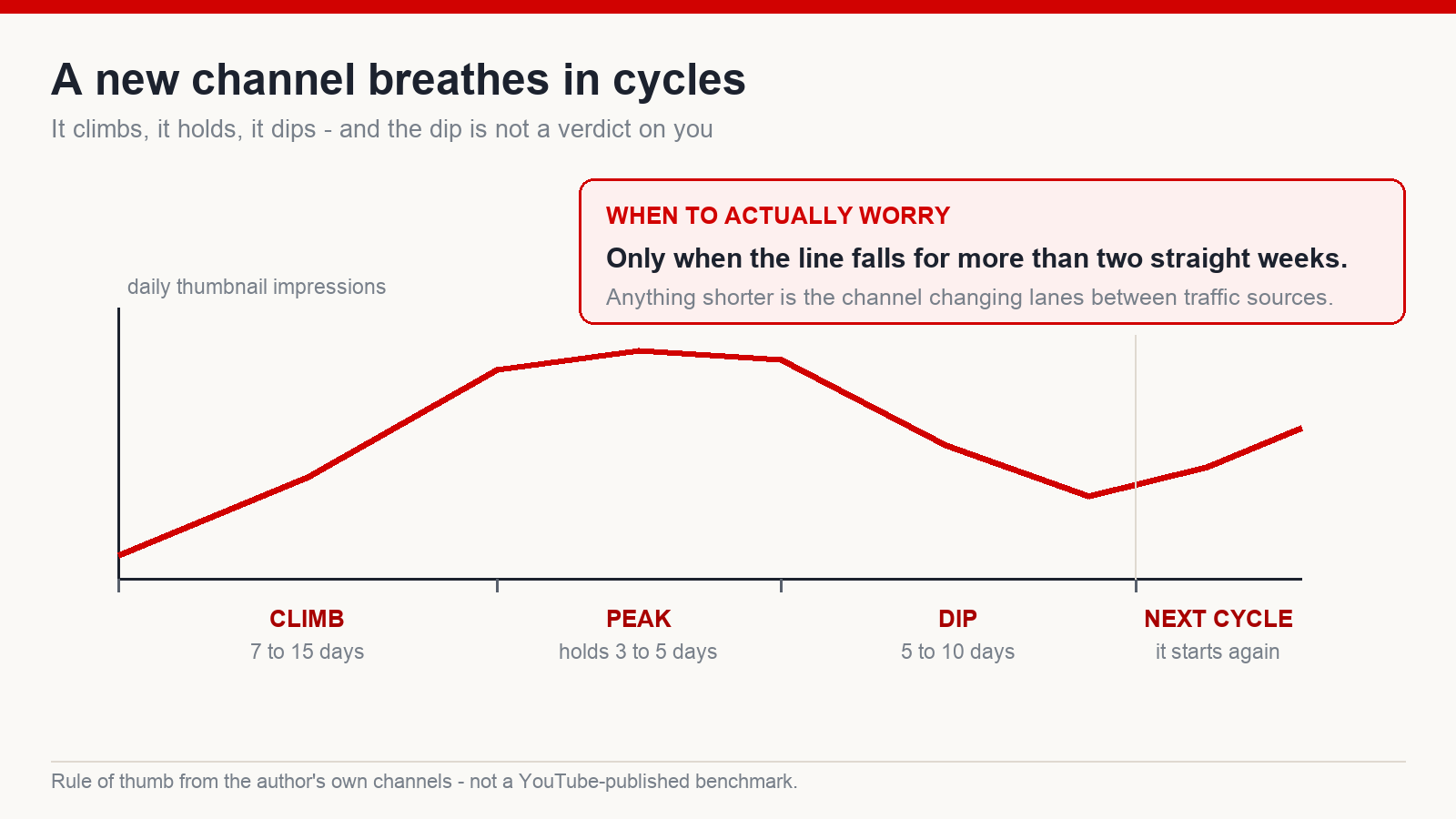
Even with those three reflexes memorised, there is one scene that still breaks people, and I have watched it repeat with almost everyone I have coached. The channel is climbing steadily, every upload nudges impressions a little higher, and then on day eight the line stalls and turns down. Panic. I have had people message me late at night sounding like they were about to lose something enormous. Then they start deleting videos, replacing every thumbnail, and some of them seriously consider scrapping the channel and starting again – while the channel was only catching its breath between beats.
Watch your own breathing for a second. You inhale and then you have to exhale; nobody survives by holding one breath forever. A new channel breathes on its own rhythm too. From what I have observed, a cycle tends to climb for something like 7 to 15 days, but the true peak only holds for around 3 to 5 days. Then it comes down, taking roughly 5 to 10 days. Only when the fall runs longer than two straight weeks is it worth sitting down to investigate. Inside that window, a dip is what a living thing does, not proof you did something wrong. Again: these are shapes from my own channels, not published YouTube figures, and yours may breathe differently.
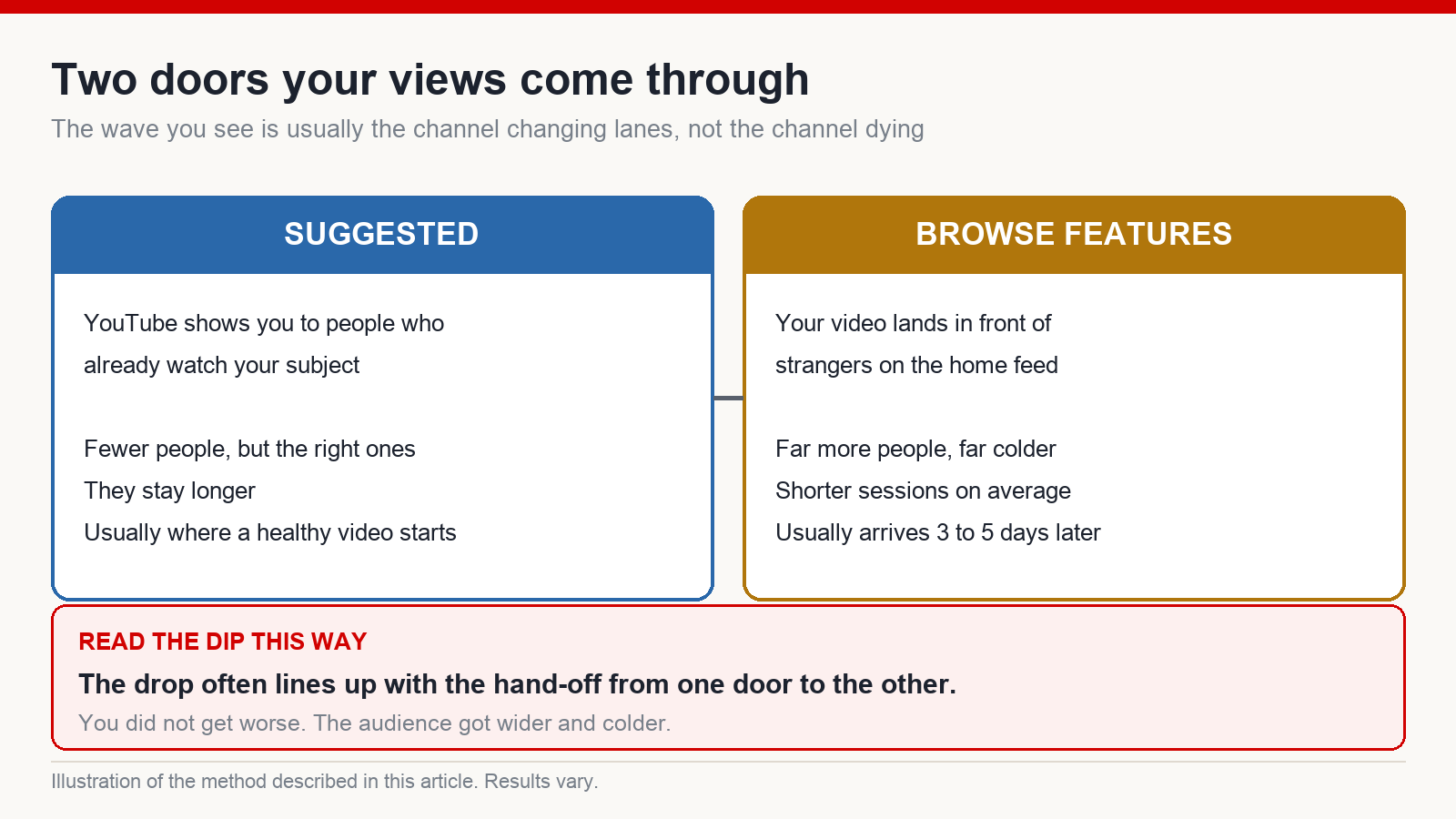
Why is there a wave at all? Because your video is watched through two different doors. The first is suggested: YouTube puts you in front of people who already watch your subject, so there are fewer of them but they are the right ones and they stay longer. The second is browse features: your video lands in front of strangers on the home feed, who click out of curiosity and often leave quickly. A healthy video usually breaks out through suggested first, holds for a few days, and only spreads into browse features around day three to five. The wave coming down is frequently the channel changing lanes from one door to the other. You did not get worse. The audience got wider and colder.
One more rule I would like carved into your head: every test has to report a number back. After you swap a thumbnail, do not rush to check CTR. What you look at is the impressions the new image earns – is YouTube carrying it out more often? And give it time to explore; do not change something today and pass judgement tomorrow. Every change gets a number before and a number after. Without a number, it is not a test. It is guessing, and guessing makes you dizzy.
What to do this week: a checklist that keeps you calm and shipping
You have the map now. Here is everything packed into a checklist. Print it, stick it on the wall next to where you edit, glance at it once a day – enough to keep your hands working and your heart quiet.
- Open YouTube Studio once a day. Opening it ten times does not speed anything up by a single minute. It only costs you a night of sleep.
- Look at one column: thumbnail impressions. Views, CTR, watch time – a new channel has nowhere near enough data for those to speak honestly. Look past them on purpose.
- Publish on a steady rhythm. Upload private, then switch to public by hand at your chosen minute. No scheduling, no premieres, no live streams, no A/B tests.
- Read the line in three states. Flat or falling, keep feeding it. Rising, widen a little and add some Shorts, still feeding it. Do not tear the channel down over a dip.
- Stay calm through the down beat. A dip lasting 5 to 10 days is ordinary breathing on my channels. Only a fall that runs past two weeks deserves a proper investigation.
- Every test reports a number. Change a thumbnail, write down impressions before and after, and give the system a few days to explore before you conclude anything.
- Publish more videos. This one outweighs the six above put together.
If doing this alone feels like the kind of thing you might quit right at the bottom of a wave, find a structure and other people to go through it with. What matters is having something that keeps you shipping during the flat stretches, not something that promises a result.
How long before views, CTR and watch time become readable?
In my experience, metrics only start being worth reading once the channel reaches roughly a thousand views inside 48 hours and holds it for at least two days. Before that threshold, whether a video got a few hundred or a few thousand views, the sample is too small for CTR and watch time to be honest. Stay on impressions.
What is the difference between impressions and views?
Impressions count how many times YouTube put your thumbnail in front of a user – how many times the system carried your video out and offered it around. Views count how many times someone actually clicked – how many times people nodded. A new channel watches the first one, because it tells you whether YouTube is still willing to distribute you.
My new channel climbed for a few days and then impressions fell. Did I do something wrong?
Most likely not. On my own channels a cycle usually climbs for 7 to 15 days, peaks for 3 to 5, then dips for 5 to 10 as the channel changes lanes from suggested traffic to browse features. Only a fall lasting more than two weeks is worth a real sit-down.
How do I publish at a specific time without using the scheduler?
Upload the video as private, and at the minute you want, switch it to public yourself. You keep full control of the timing while avoiding the pinched opening push I have seen on videos left in the “scheduled” state.
After changing a thumbnail, which metric shows whether it worked?
Look at the impressions the new image earns, not the click-through rate. The question is whether YouTube is carrying the new thumbnail out more often. Write down a number before and a number after, and give the system several days to explore before concluding.
A note on the numbers: every figure in this article about cycle lengths, view thresholds and day counts is a reference point I derived from my own channels and from coaching other creators. None of it is a guarantee. Channels differ by niche, by publishing rate and by how long the person behind them keeps going. I am not promising this article will produce views or revenue. I am showing you where to look so you do not quit for the wrong reason.
Written by Phuc, a YouTube trainer who has been building on the platform since 2017 (nine years), working mainly on faceless channels aimed at English-speaking audiences in the US, UK, Germany and Japan.
The full step-by-step system I run with the creators I work with lives at mmoyoutube.com.
Disclaimer: this is personal experience and method, not financial advice and not a promise of any outcome. YouTube’s features and policies change over time.



